Over Winter break, the TLi team has updated some features and tools within Canvas. Below, we’ll give some highlights and descriptors about what’s changed and what you need to know.
New IgniteAI Features in Canvas (Opt-in)
Canvas has introduced several new AI features that we’ve made available in our Canvas instance. These features are both opt-in and disabled by default. This means that you (the instructor) have the option to turn them on in a single course, all courses, or whatever fits you best. And, even with the options enabled, it doesn’t mean that you need them. They are also instructor-only tools, so students won’t be able to use them.
The two features that we have enabled are Discussion Summaries and Question Generation for New Quizzes. Take a look at the knowledge base articles below to see how to enable these features.
VoiceThread Integration Updated to LTI 1.3
Our VoiceThread integration within Canvas has been updated to the latest version. On the surface, this doesn’t mean too much in the sense that the VoiceThread interface is the same with the updated integration. However, this version will continue to receive updates from VoiceThread as they are made, while the previous integration will not.
That said, there are some things to be excited about. With this new integration, after you’ve built a VoiceThread assignment, the next time you do a course copy, the VoiceThread assignment will be copied as well without the need for you to rebuild the assignment. This will be a big timesaver for future semesters!
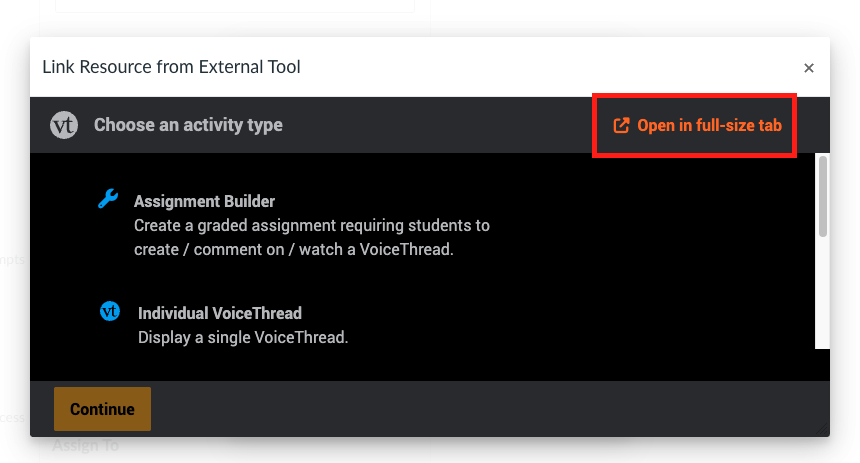
The other change that you’ll notice is that the building process will now occur within the Canvas assignment screen as opposed to showing up after you click the Save button at the bottom of the new assignment page. We recommend clicking the Open in full-size tab option to set up the assignment for the best experience. Once you configured the VT assignment, you can always edit it afterwards as needed, just like you’ve been able to before.
Follett My Materials
Follett My Materials has been added to Canvas. This integration allows instructors to easily select their textbook materials and allows students to easily see which textbook materials are required for each of their courses. You can view more information about My Materials on Follett’s website, as well as contact the CSUCI bookstore at bookstore@csuci.edu.

Panopto and Zoom Integration

Panopto and Zoom have been connected, making it easier to store and share Zoom cloud recordings. The integration is an opt-in feature that allows you to automatically import Zoom cloud recordings into a designated folder within Panopto. Once in Panopto, the videos can easily be shared within your Canvas course using the existing Panopto integration. For example, they can easily be added to a page or a module.
Check out our Knowledge Base article about how to set up the Panopto Zoom integration for step-by-step instructions on how to activate the integration and connect your Zoom and Panopto accounts.
Learn More from the TLi Team!
Be sure to check out our TLi Events Calendar to keep up to date with and register for our various offerings/workshops.
