Are you preparing to build classes in Canvas for Spring semester?
Teaching and Learning Innovations has a Course Starter Kit available that can help lighten your course-building workload. The Starter Kit is an accessible template that you can copy into your courses and populate with your own instructional content. The kit has been updated to meet current Title II accessibility standards, and its elements are designed to align with the CSU Quality Teaching and Learning (QLT) rubric. It also provides a consistent visual design and prebuilt course elements that you can duplicate and fill with your own content. Using the Starter Kit is a great starting point for ensuring that your course is accessible, aligned to quality online teaching practices, and visually consistent from the start.
What’s Inside the Course Starter Kit
- Welcome module with course navigation guidance
- A sample content module
- Structured module pages
- A Canvas-based syllabus template
- Student support resources
- Instructor support resources
How to Find and Import the Course Starter Kit
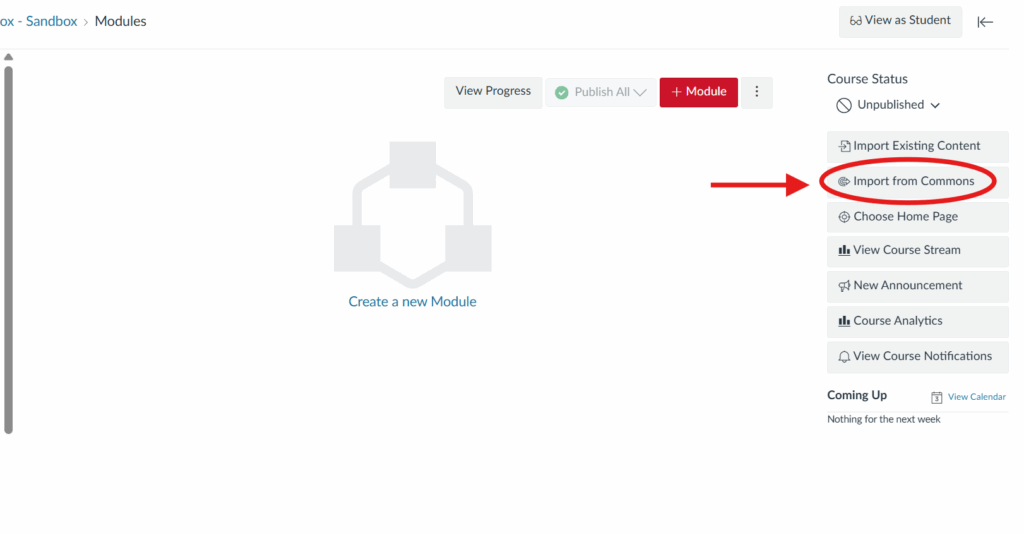
- From your empty course shell, click Import from Commons from the list of buttons provided. Depending on the size of your screen, the buttons are on the right side of the screen, as shown below, or towards the bottom of the page.
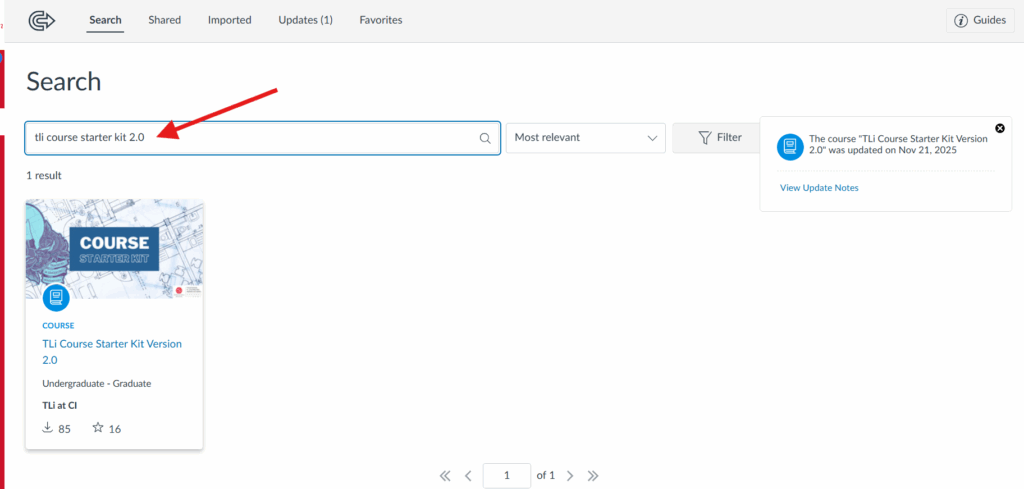
- Enter TLi Course Starter Kit 2.0 in the Canvas Commons Search bar.
- When you click on the Course Starter Kit in Commons, you’ll be taken to a preview of the template. You’re welcome to scroll through the preview and click on individual items to get a feel for how the template is set up and what elements it contains. You can also view a public version of the Starter Kit in a course to see what the template looks like in action.
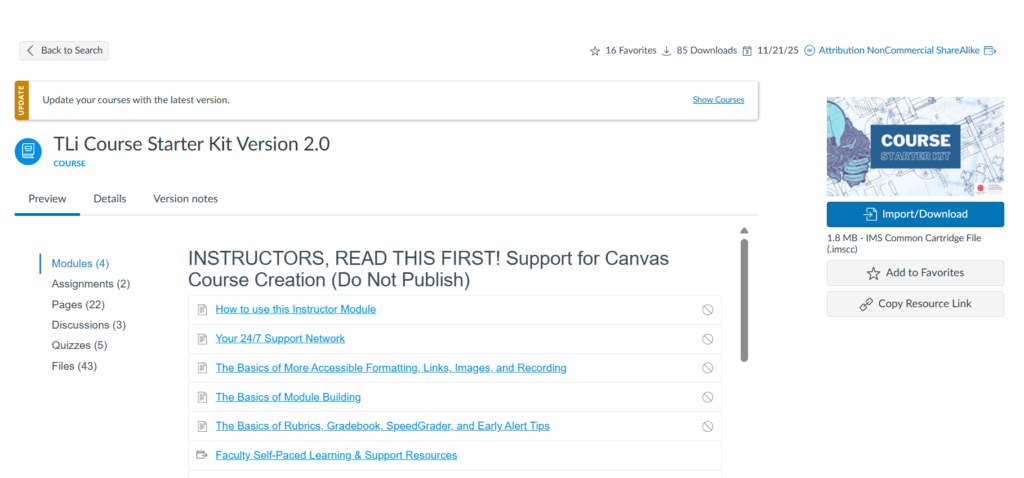
- When you’re ready to add the Starter Kit to your course, click the Import/Download button. You’ll be prompted to select the course you’d like to import the template to.
- Optional! If you’d like to try the course template outside of one of your main course shells, you can follow the instructions in TLi’s Knowledge Base article to create a sandbox course and import the Course Starter Kit there. Sandbox course content can be imported into a main course later.
- Once the template is in your course or sandbox, you can edit it as you would any other course content.
- In Module View, you can view, edit, duplicate, delete, and organize specific course elements.
Built-In Instructor Support in the Course Starter Kit
In addition to module, page, and assignment templates that you can fill with your own content, the Starter Kit also includes an instructor information module. This module should be left unpublished so that it’s invisible to students but available as a resource for you. It contains reference material, links to support, and tips on best practices for accessibility and course design. Note: The template gives you an accessible foundation, but the content you add, including videos, documents, and images, will need captions, alt text, and appropriate formatting. For more guidance on making your course accessible for all users, please see TLi’s resources on Accessibility and Inclusive Design.
Using the Course Starter Kit Across Modalities
The Course Starter Kit provides the essential pieces you need to build a fully online or blended course. However, you can customize the elements as you see fit, including removing or unpublishing content you don’t need, so the template can also be used to organize content for in-person courses.
More Information and Additional Course Template Options
For more information, you can view the Course Starter Kit 2.0 How-To Guide in TLi’s Knowledge Base.
If you’re interested in providing a dual language course experience, Bilingual Course Kits are available to support that option.
If you have questions about course starter kits or need support with spring course prep, you can find resources and learn more about how to connect with the TLi team. We wish you a smooth and productive start to the semester!
